A customer wants production data from a machine—cycle counts, alarms, recipes, process parameters, maintenance information, MES connectivity, or perhaps data for future AI tools.
The simple answer can be:
“We’ll put the PLC on the plant network.”
For a machine builder, I don’t think that should automatically be the first choice.
The PLC or motion controller has an important job: run the machine.
If all we need is to move information out of the machine, does the controller really need to be on the plant network?
Keep Machine Control Local
My preference has generally been to keep the PLC or motion controller, drives, I/O, and other control devices on their own private machine network.
The HMI communicates with that network to operate and monitor the machine. If plant connectivity is required, the HMI or another edge device handles that connection.
Conceptually:
Plant Network → HMI / Data Layer → Machine Control Network
This separation provides benefits unrelated to cybersecurity.
Standardize the Machine
Suppose I build five identical machines.
I would like all five to use the same internal addresses:
PLC — 192.168.10.1 HMI machine port — 192.168.10.10 X-axis drive — 192.168.10.20 Y-axis drive — 192.168.10.21
If those machine networks remain isolated, I can reuse that addressing on every machine.
That means the controller program, HMI configuration, drawings, drive setup, service procedures, and replacement instructions can remain much more consistent.
Only the plant-facing connection needs to be configured for the customer’s network.
One limitation: if the plant eventually wants to route directly into several machines, duplicate subnets can complicate routing and remote access. But for isolated machine networks, standard addressing can make commissioning and service much simpler.
Keep Plant Changes Out of the Machine
Plant networks change.
Servers move. VLANs change. IP addressing changes. Security policies change.
Those may all be necessary IT changes, but I don’t necessarily want them forcing changes to the PLC, motion controller, drives, or remote I/O.
If the plant connection stops at an HMI, gateway, or firewall, the machine network can remain relatively stable.
That is good maintainability.
It can also improve security.
NIST recommends grouping OT components into levels or zones and controlling communications between those zones. Firewalls, routers, switches, and other isolation devices can then permit only the communications that are actually required. [1]
Think of Connectivity as Four Levels
Rather than saying there is one correct network architecture for every machine, I think it is more useful to look at it as a progression.
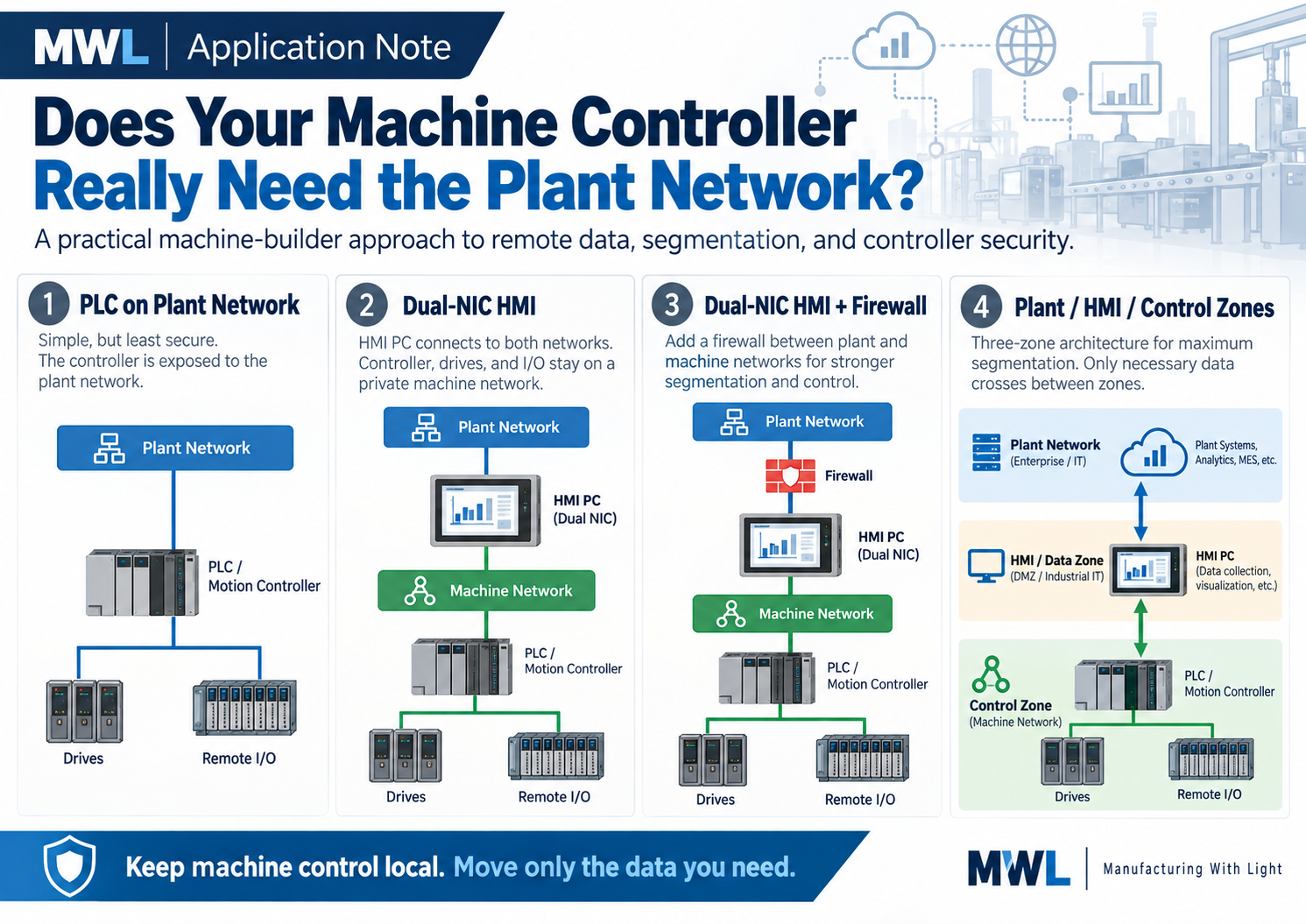
Level 1 — PLC Directly on the Plant Network
This is the simplest approach.
It may also be completely appropriate in a plant with a properly designed and segmented OT network.
But now the controller is directly reachable from that network, and the machine builder has to coordinate addressing, access, network changes, and security requirements with the customer.
If the PLC doesn’t actually need plant-network services, I would at least question whether that connection is necessary.
Level 2 — Dual-NIC HMI
One Ethernet adapter connects the HMI to the machine network. A second connects it to the plant network.
The PLC, drives, and I/O remain on the private machine network while the HMI collects and transfers the information the plant actually needs.
This is an architecture I like for many machines, but there is an important qualification:
A dual-NIC HMI is not a firewall.
The two adapters should not be bridged, and the computer should not casually be configured to route traffic between them. Microsoft documentation confirms that bridging adapters creates connectivity between otherwise separate network segments. [4]
I also normally wouldn’t configure a default gateway on the machine-side adapter unless there is a specific reason.
The objective is simple:
The HMI should exchange data between applications—not turn the two Ethernet networks into one network.
There is still risk. If somebody compromises the HMI, that computer already has legitimate access to the machine network.
So I would consider this useful functional separation, not a complete cybersecurity boundary.
Level 3 — Add a Firewall
The next step is to put a firewall or industrial security gateway at the plant boundary:
Plant Network → Firewall → HMI → Machine Network
Now the firewall can decide what is actually allowed to reach the HMI.
For example, the MES system may need access to one HMI data service. Allow it.
Perhaps the HMI needs to send production information to one server. Allow it.
Everything else can be blocked.
This is the basic principle behind network segmentation:
Allow the communications the application requires. Don’t automatically allow everything else.
CISA specifically recommends separating IT and OT networks and notes that properly implemented firewalls and DMZs can restrict communications and help prevent unauthorized access to higher-value OT assets. [2]
Level 4 — Separate Plant, Data, and Control Zones
For machines requiring stronger protection, the architecture can go another step:
Plant / Enterprise Zone
↓
HMI / Data Zone
↓
Machine Control Zone
Instead of relying on the HMI’s two network adapters to provide separation, a firewall or security gateway controls communications between the zones.
The HMI might be allowed to communicate with the PLC.
The MES system might be allowed to communicate with a specific service in the HMI/data zone.
But:
Plant → PLC: Blocked
Plant → drives: Blocked
Plant → remote I/O: Blocked
This requires additional hardware and configuration and may be unnecessary for a simple standalone machine.
But it creates a much clearer security boundary.
This segmented architecture aligns with NIST’s OT guidance, which specifically discusses zones, DMZs, isolation devices, and permitting only authorized communications between network segments. [1]
Remote Data Is Not Remote Support
Machine builders should consider another distinction.
Getting production data out of a machine might look like:
Machine → HMI → Plant Database
Remote support is different:
Remote Technician → Plant → HMI → Machine
The first requirement moves information out.
The second can allow someone outside the machine to make changes.
Those should not automatically use the same security rules.
CISA recommends securing essential OT remote access with measures including network segmentation, least privilege, strong authentication, and phishing-resistant multifactor authentication. [3]
For a machine builder, I would also want remote access to be identifiable and controllable. Who connected? When? What level of access did they have? Can the customer disable remote service when it isn’t required?
Production data does not automatically require remote control.
One Simple Test
There is a very simple test I like for this architecture:
Unplug the plant-network cable.
What happens?
MES reporting may stop. Remote access disappears. The HMI may report a communications fault. Production data may need to be stored locally until communications return.
But the machine should still be able to perform its basic job.
The PLC still communicates with its I/O.
The motion controller still moves the axes.
The drives still operate.
The operator can still run production.
For many machines, that is a good indication that machine control and external connectivity have actually been separated.
The Question I Would Ask First
I’m not suggesting that PLCs should never connect directly to plant networks.
Modern plants can have well-designed, segmented OT networks where direct controller connectivity is appropriate.
But I would change the starting question.
Instead of asking:
“Why shouldn’t we connect the PLC to the plant network?”
ask:
“What does the PLC actually need from the plant network?”
If the answer is:
“Nothing. We just need to get production data out.”
then the controller may not need to be there at all.
Keep machine control local.
Move only the information that needs to move.
Use the HMI or an edge device to handle external data where appropriate.
And when the risk requires stronger protection, put a real security boundary between the plant and the machine.
Design connectivity into the machine—don’t add it later by plugging another Ethernet cable into the controller.
References
[1] NIST SP 800-82 Rev. 3 — Guide to Operational Technology (OT) Security. Final NIST guidance covering OT architectures, segmentation, zones, DMZs, firewalls, remote access, and security controls. NIST SP 800-82 Rev. 3
[2] CISA — Layering Network Security Through Segmentation. Practical overview of separating IT and OT networks with segmentation, firewalls, and DMZs. CISA Network Segmentation Guidance
[3] CISA — Primary Mitigations to Reduce Cyber Threats to Operational Technology. Current guidance on IT/OT segmentation, remote access, least privilege, VPNs, and multifactor authentication. CISA OT Mitigations
[4] Microsoft Learn — Windows Network Bridge: Microsoft documentation explaining how Windows network bridging connects separate network segments. Microsoft Network Bridge Documentation